How to Passaload (share) load in TM?
Suppose you need to make an urgent call, send a text or SMS, or use mobile data, but you run out of balance, what will you do? You don’t need to worry, as TM/Globe offers the Share-a-Load feature, also known as PassaLoad. Users can share load using text, the GlobeOne app, or even without texting.
Load can be shared from tm to tm, tm to globe, tm to tnt and smart. It helps in urgent communication, especially in areas without easy access to e-load retailers or GCash. Parents often send load to their kids for mobile data or school communication. Similarly, friends can share load to help each other without going to a store
Lets explore all ways to pass a load in TM Sim, Globe and TNT. People can share load from ₱1 to ₱500. Globe or TM prepaid users can share load up to ₱150 per transaction with a maximum of 5 transfers per day, while postpaid users have a ₱500 daily limit.
How to Share A Load in TM/Globe Using *143#
*143# dialling gives you option to share your load. Just dial *143# in your mobile pad. Make sure you have complete tm signals
- Open your phone dialer.
- Dial *143# and press the call icon button.
- Now you will see many options. Just type 0 to select the My Account option from the menu.
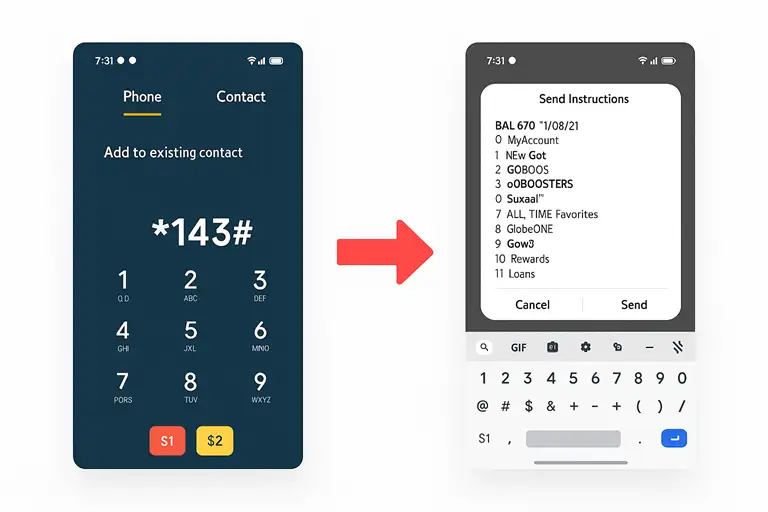
- Now type 4 and click on send. This option is for Share a load/promo/MB.
- Now select option 1 and press send. This option is to share a load without a PIN. It’s up to you which option you select because you can see share a load with PIN, share a promo with or without PIN, and share MB with or without PIN. But the best option is to use without PIN because it is quick and very safe.
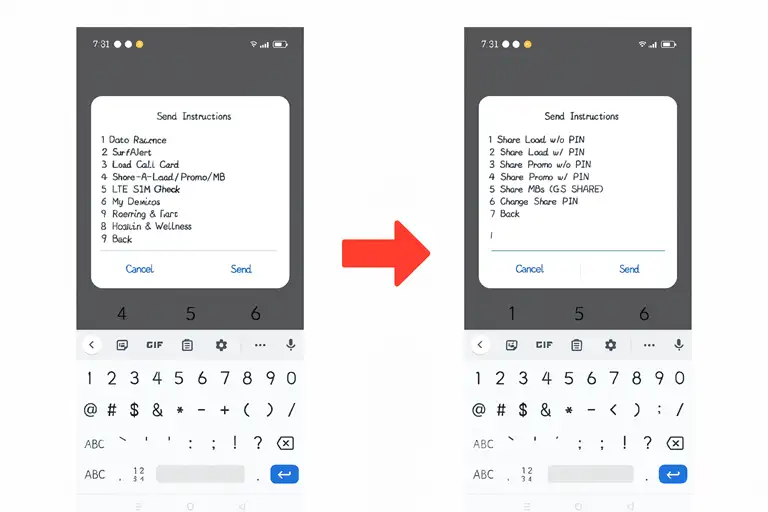
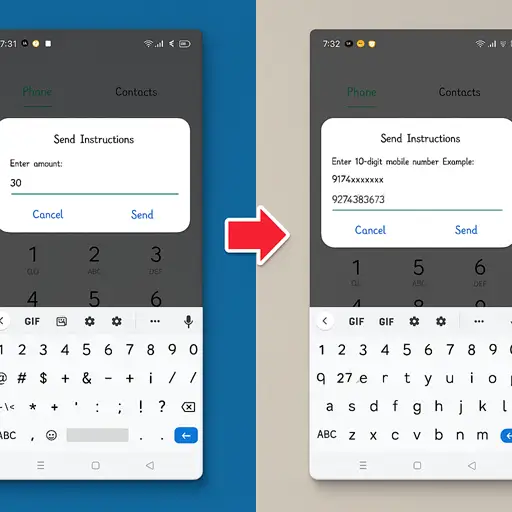
- Now a pop-up screen will open, which will ask you to share the amount.
- Enter the desired amount you want to share.
- In the next screen, add the 11 digit number of the person you want to send load/promo or MB to friend or family
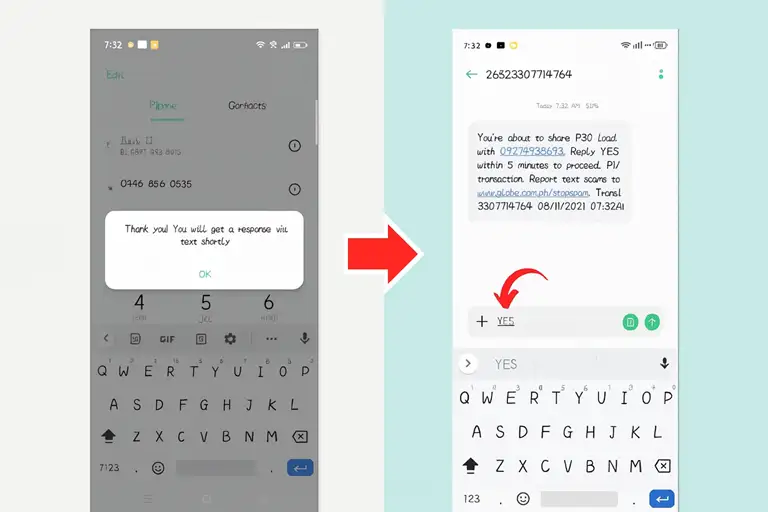
- After sending, you will see a screen saying Thank you, you will get a response shortly.
- In a few seconds, you will receive a confirmation message asking whether you want to share the load.
- Reply with YES, and you will receive another message that your load has been shared successfully.
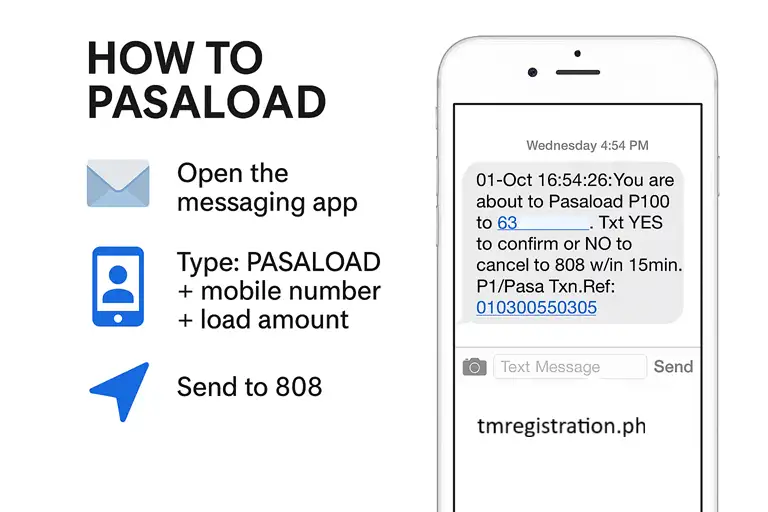
Share or Pasa load TM to TM via Text
You can use only text message to share load from tm to tm. Open inbox. Send PASALOAD <number> <amount> to 808
How to Share a Load in TM using GlobeOne App
The GlobeOne app provides an easy and modern way to share load without typing codes.
- Open the GlobeOne app and sign in with your TM number.
- Tap Buy Load or Load from the home screen.
- Enter the recipient’s number and choose the amount to send.
- Review the details and tap Confirm to finish.
- You’ll see a confirmation on the app, and an SMS will also be sent to verify that the load was shared successfully.
How to Pasaload TM to TM 2025
Sharing load between TM users in 2025 remains simple and convenient.
- Open the Messages app and create a new text.
- Type the amount or follow the PASALOAD format provided by TM (Send PASALOAD <number> <amount> to 808)
- Send it to the other TM user’s number.
- Wait for the confirmation message and reply YES to complete the process.
- This updated 2025 method ensures smooth transfers, keeping the same reliability with faster confirmation.
How to Pasaload TM to Globe
Since TM and Globe share the same network, you can pasaload easily between them.
- Open your phone’s dialer and enter *143#.
- Choose Share Load or Promo from the menu.
- Enter the Globe number and the amount you wish to share.
- Confirm the transaction and wait for the success message.
- The load will appear in the Globe recipient’s balance within a few seconds.
Tm Pasaload Amounts and Validity Periods
When you share tm load then it have some validity perios. It depends on amont transferred. Higher the load the higher will be validity
| Load Amount (₱) | Validity Period |
|---|---|
| 1 – 10 | 3 days |
| 11 – 50 | 15 days |
| 51 – 100 | 30 days |
| 101 – 150 | 45 days |
| 151 – 250 | 60 days |
| 251 – 299 | 75 days |
| 300 and above | 1 year |
After sharing load always check your balance to confirm wether it is successfull or unnecessary deuctions
How to Pass a TM Promo?
You can share a Globe or TM promo easily through text. Type the promo keyword, like GOSURF10, and send it to 2 + the 10 digit number of your recipient. Example: Send GOSURF10 to 29123456789 to share the promo instantly.
Explore TM promos
Secure your Globe or TM pasaload With Pin
You can secure your Globe or TM pasaload with a PIN. Text REG <4-digit PIN> <PIN Clue> to 2916 (₱1 charge). Example: REG 1025 BIRTHDAY to 2916. To recover a lost PIN, text GET <PIN Clue> to 2916.
Benefits of Load Sharing
If you can’t share load and don’t have any other option, you can borrow TM load then check your balance